Desktop App - Secure Offline Anonymization
Process sensitive documents without uploading to the cloud. Military-grade encryption, multi-format support, and complete privacy on your computer.
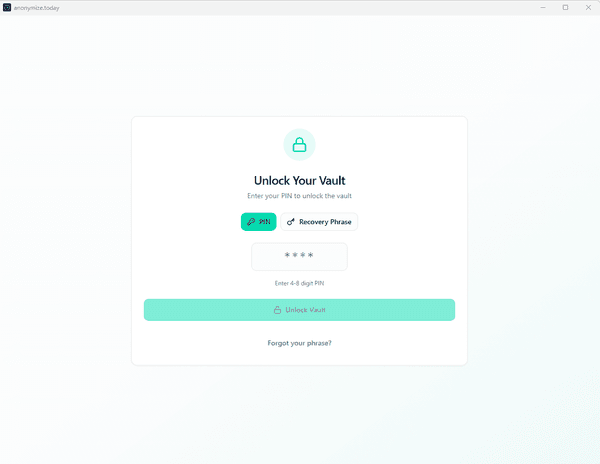
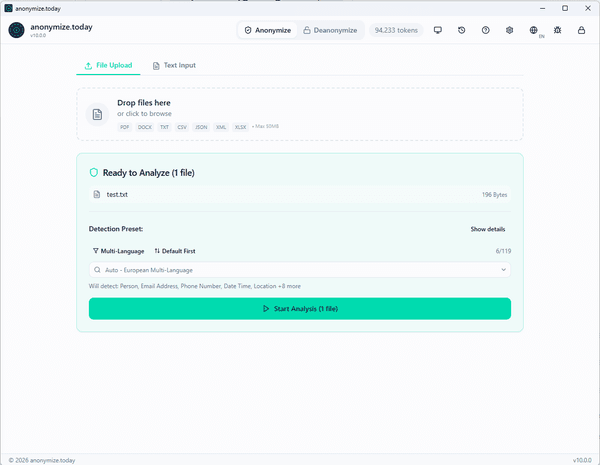
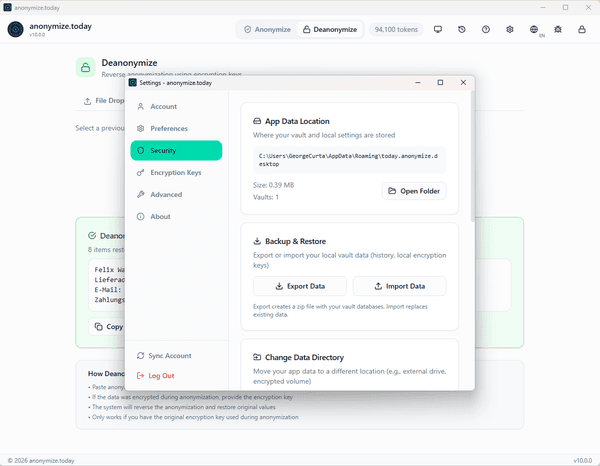
Secure Vault Unlock
1 / 11
Why Choose the Desktop App?
Complete Privacy
Documents never leave your computer unless you choose to process them through our secure API.
Offline Capability
Work without internet using cached presets and locally stored encryption keys.
Multi-Format Support
Process PDF, DOCX, XLSX, CSV, JSON, XML, and TXT files natively.
Secure Vault System
BIP39 recovery phrase with Argon2id key derivation and AES-256-GCM encryption.
Key Features
48 Languages
Full interface translation and document processing in 48 languages with auto-detection.
256 Entity Types
Detect names, emails, credit cards, medical IDs, government IDs, and more.
Multiple Methods
Replace, encrypt, hash, mask, or redact - choose the right method for each entity.
Reversible Encryption
Encrypt sensitive data for later deanonymization when needed.
Military-Grade Security
Secure Vault System
- BIP39 24-word recovery phrase for vault recovery
- Argon2id key derivation (memory-hard, GPU-resistant)
- AES-256-GCM encryption for all vault data
- Optional PIN unlock for quick daily access
Encryption Key Management
- Store multiple encryption keys for different purposes
- Per-entity-type key assignment
- Secure key synchronization with your account
- Keys never stored in plaintext
Additional Features
Drag & Drop Interface
Simply drag files onto the app to start processing. Real-time progress and instant results.
Account Sync
Sync presets, encryption keys, and token balance across devices through your account.
Processing History
Encrypted local storage of all operations. Review past work and deanonymize when needed.
Your Anonymizer, Always With You
The portable version requires no installation—simply extract and run. Keep it on a USB drive, use it on shared computers, or deploy in secure environments where software installation is restricted.
- No installation required—extract and run directly
- Perfect for USB drives and portable storage
- Works without admin rights on Windows
- No registry entries—leaves no traces behind
- Ideal for secure or restricted environments
USB Drive Ready
Carry your privacy toolkit in your pocket
Secure Environments
Use where software installation is forbidden
Shared Computers
Run without leaving any traces on the system
System Requirements
Available for Windows, macOS, and Linux with lightweight resource requirements.
macOS
- • macOS 11 (Big Sur) or later
- • Intel or Apple Silicon
- • 4 GB RAM minimum
Linux
- • Ubuntu 20.04+, Debian 11+
- • x64 architecture
- • 4 GB RAM minimum
Desktop vs Web App
| Feature | Desktop App | Web App |
|---|---|---|
| File Processing | Text only | |
| Offline Mode | Requires internet | |
| Multi-Format (PDF, DOCX, XLSX) | - | |
| Secure Vault Storage | Browser storage | |
| Processing History | Encrypted local | Server-side |
Ready to Get Started?
Download the desktop app and start anonymizing documents with complete privacy and security.